

Mobile access to Global Cards
Your cards and wallet, closer at hand.
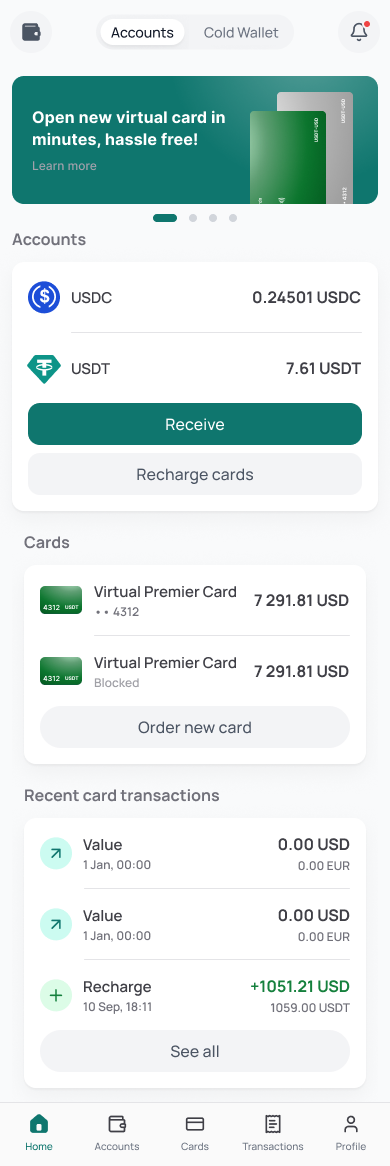
Use the Global Cards mobile experience to review card activity, manage supported assets and keep account tools within reach from your phone.
Available now
Android
Download Global Cards for Android to access your cards and wallet on your phone.
Coming soon
iOS
The iOS release is in preparation. Availability and the official App Store destination will be added to this page.
Real product flow
See card activity in context.
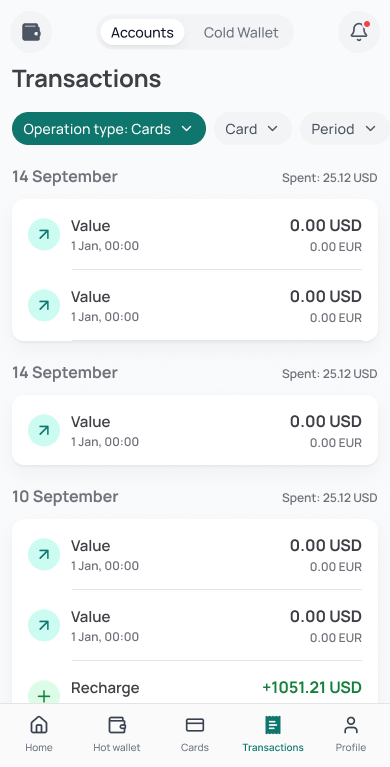
Move from the account overview to card activity without leaving the same mobile navigation. Filters keep the operation type and period visible.
Illustrative interface — names, dates and values shown in previews are demonstration data.
Mobile-first account access
A practical app for wallet and card activity.
Global Cards brings core payment and wallet tools into a mobile interface designed for the device you already use throughout the day.
One mobile control surface
Review wallet access, card tools, supported assets and recent activity without moving between separate experiences.
Built for everyday payments
Keep payment tools close for online services, subscriptions, travel expenses and other supported card use cases.
Security details stay visible
Check release information, account controls and device-level access before installing or approving an action.
Android installation
Install from a source you can verify.
Download the app and follow the steps below to get started.
Use the official source
Use the Download APK button on this Global Cards page to get the Android release.
Open the downloaded file
Find the APK in your Downloads folder and tap it to begin installation.
Approve Android installation
If prompted, allow installation from the browser or file manager used for the verified download.
Open and sign in
Launch the app and follow the available account access and security steps shown on your device.
Ready to get started?
Your account, wherever you go.
Install Global Cards on your Android phone and sign in to access your cards and wallet.
Need help installing?
Follow the installation steps above or visit our FAQ for answers to common questions.
Need product guidance? Visit the Global Cards FAQ.